
Shopify inventory forecasting: what Shopify shows you, and what it does not
Short answer: Shopify does not forecast. It shows you what you have right now and how fast it has been moving, which is a rear-view mirror. A forecast needs three things Shopify does not hold: your sales velocity per SKU, your supplier lead time, and a safety buffer. Put those together and you get the only two numbers that matter, the stock level that should trigger an order and the date you need to place it.
This page shows what that looks like in practice, with real screenshots from the app rather than a polished mockup, and an honest comparison of your three options: Shopify on its own, a spreadsheet, or a tool that does it for you.
Why I built this
I run Chilli Chan’s, a food brand stocked at Albert Heijn, Jumbo and EDEKA. Stockouts cost me weekends. Not in a dramatic way, just the same Sunday evening every few weeks, rebuilding the same spreadsheet, trying to work out which SKU was about to run dry and whether the container I had already paid for would land in time.
The maths was never the hard part. The upkeep was. OrderBee is the thing I wanted to exist: it connects to Shopify, keeps the velocity and lead times current, and turns the Sunday rebuild into a Monday review. Everything below is the actual product, running on our own data.
Step 1: connect Shopify, and your B2B sales too
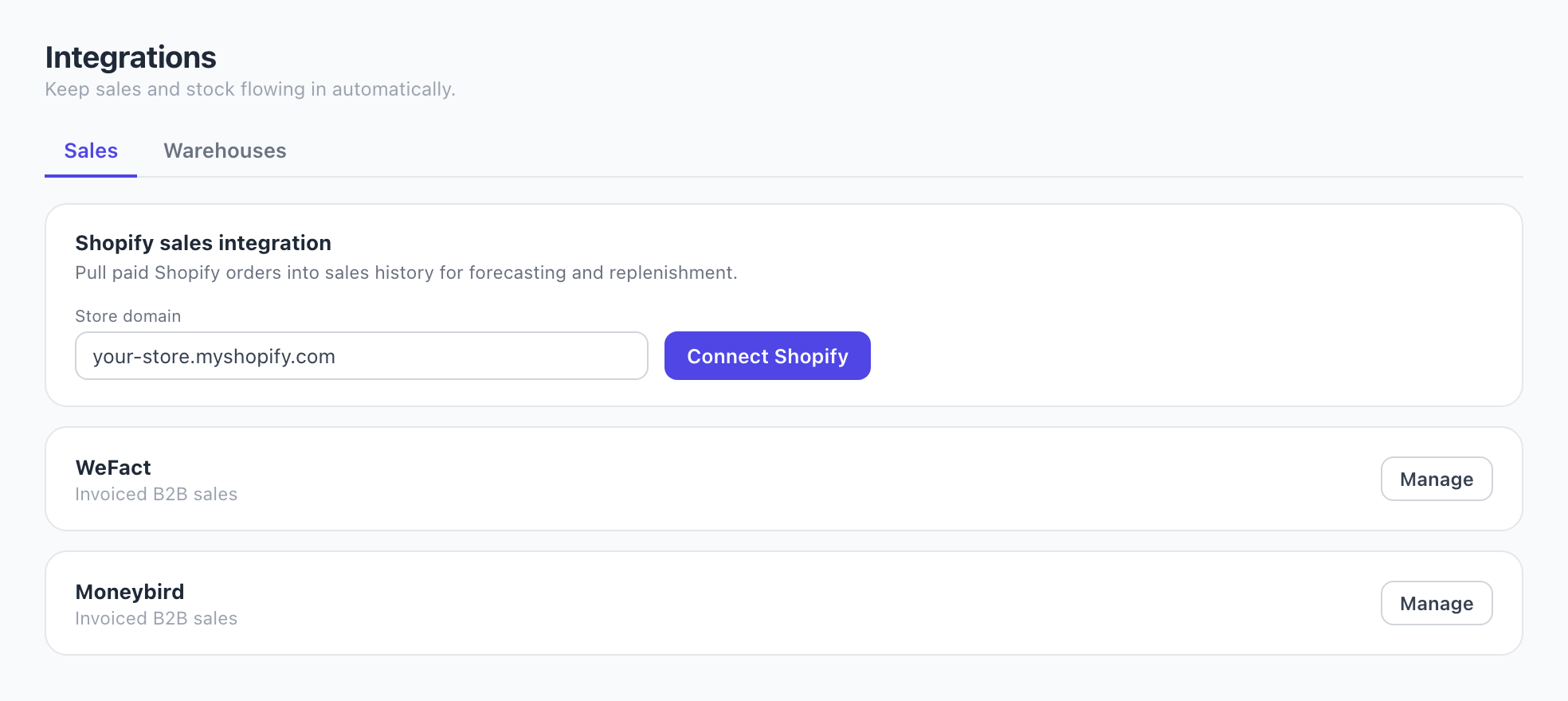
Shopify connects in one click over OAuth and pulls your order history with it, so there is no waiting period before the first forecast. Nothing is written back to your store.
If you also sell wholesale, that demand needs to be in the same picture or your forecast will be wrong in a predictable direction. Invoiced B2B sales come in from Moneybird or WeFact, the two most Dutch brands actually use, or as a CSV. They are counted as their own channel rather than blended into your DTC average.
Step 2: set the horizon, pick a baseline
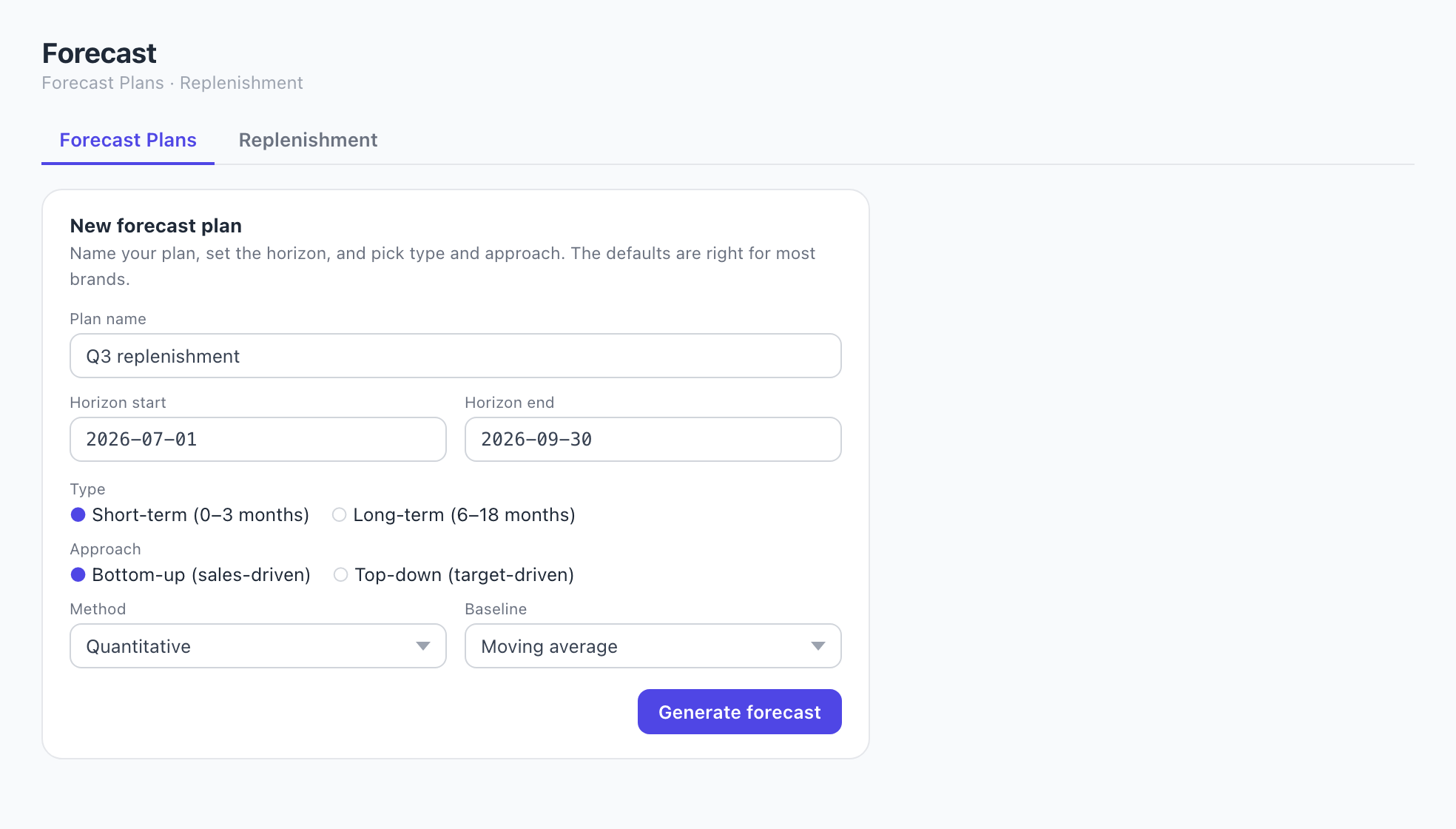
A forecast plan is just a period and a method. Short term, zero to three months, is what drives reordering. Bottom-up means the plan is built from what each SKU actually sells, rather than from a revenue target you are hoping to hit. A moving average is the honest default for a steady seller, and it is hard to fool yourself with.
If you want to understand the arithmetic before you trust any tool with it, the reorder point formula is three lines long, and you can check your own numbers against the free reorder point calculator without signing up for anything.
Step 3: the part you actually use
This is the screen that replaces the Sunday spreadsheet. Every SKU, in every warehouse, with what is on hand, how fast it is moving, where the replenishment comes from, how much to order or move, and a status. Sort by status, act on the red ones, close the tab.
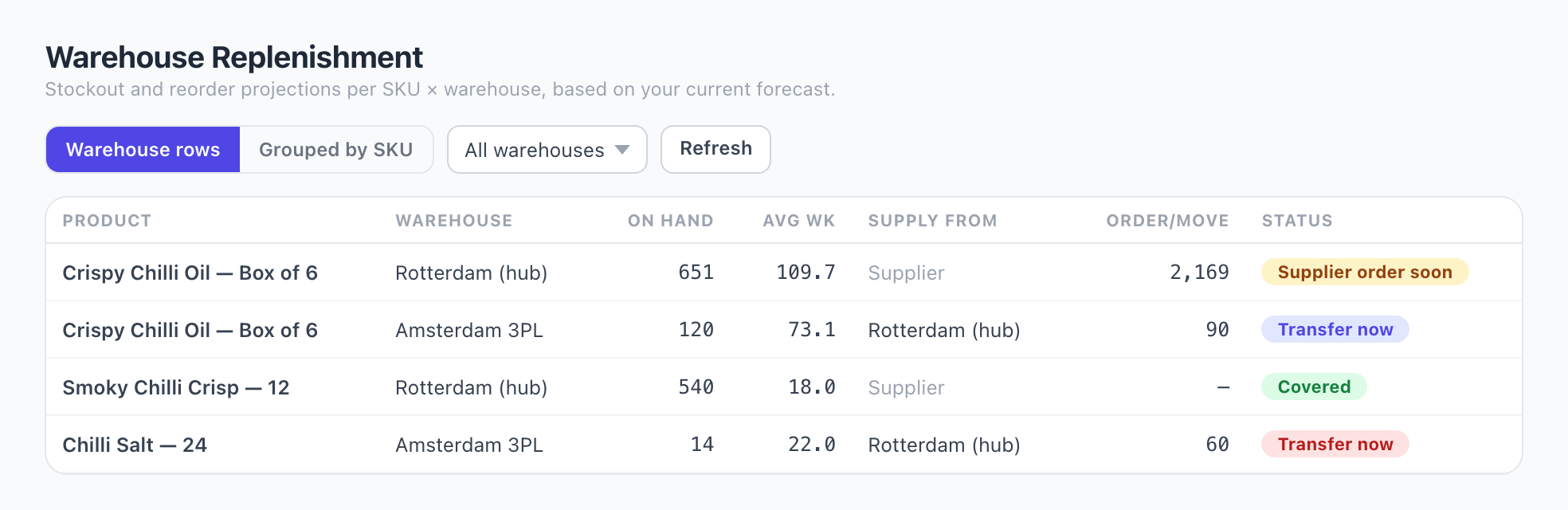
That last point is the one spreadsheets handle worst. Once stock sits in more than one place, a single reorder point per SKU stops being true. The hub needs a supplier order on a long lead time; the spoke needs a van from the hub on three days. Two different decisions, same product.
Your three options, honestly
Most small brands do not need to buy anything. Two of these three columns are free, and for a simple setup they are genuinely enough. Here is where each one stops.
| What you need | Shopify on its own | A spreadsheet | OrderBee |
|---|---|---|---|
| Current stock level | Yes | Manual, as at your last update | Yes, synced |
| Sales velocity per SKU | Sell-through reporting | Yes, once you export and build it | Yes, per SKU and per channel |
| Supplier lead time | Not tracked | Yes, if you type it in | Yes, per supplier |
| Safety stock | No | Yes, if you build the formula | Yes, per SKU and per warehouse |
| Reorder point and date | No | Yes, but you rebuild it monthly | Calculated daily |
| Stockout warning before it happens | Low-stock alert at a fixed number | Only when you look | Projected stockout date |
| Multiple warehouses and transfers | Stock per location | Painful past a few SKUs | Hub and spoke with transfer advice |
| B2B sales from Moneybird or WeFact | No | Manual paste | Imported as a channel |
| Cost | Included | Free, plus your evenings | From €49 per month |
Read that table as a decision, not a sales pitch. If you have ten SKUs in one warehouse selling through one channel, build the spreadsheet. Our Excel guide and free template will get you there in an afternoon and costs nothing. It stops being worth it when the upkeep costs more time than the planning: several warehouses, several channels, several suppliers with lead times that drift.
What this is not
Worth being blunt, so you do not waste a trial. OrderBee is forecasting and reorder timing. It is not a warehouse management system, it does not do full inventory management with barcode scanning and bin locations, and it does not do your bookkeeping. It reads your sales, works out when and how much to buy, and stops there. If you need a WMS, you need a WMS.
See it on your own SKUs
Connect your Shopify store and your order history comes with it, so you get a reorder plan the same day rather than waiting weeks for data to build up.
Frequently asked questions
No. Days of inventory divides what you have on hand by how fast you have been selling it. It is a snapshot of the past, not a projection. It does not know your supplier lead time, it does not add a safety buffer, and it will not tell you the date to place an order. Useful as a warning light, not as a plan.
Not really. Shopify Admin shows stock levels and some sell-through reporting, and Stocky offered forecasting for Shopify Plus merchants until it was discontinued. For a demand forecast per SKU with lead times and reorder points you need either a spreadsheet or a dedicated app.
About eight weeks gives usable reorder suggestions, and accuracy improves from there. When you connect Shopify your order history comes along, so most stores see a forecast on day one rather than waiting to accumulate data.
Yes, and it matters more than people expect. DTC, wholesale and retail have different demand shapes, so forecasting a blended average hides the pattern. Shopify connects directly; B2B invoiced sales come in through Moneybird, WeFact or a CSV upload and are counted as their own channel.
Yes. You can set one location as the supplier hub and others as transfer spokes, and get separate advice per location: order from the supplier here, move stock from the hub there. That is the Warehouse Replenishment view in the screenshot above.
No. It reads orders and products over OAuth and never writes back to your Shopify inventory. You keep control of what you actually buy.
Written by Seb Hoffmann, founder of OrderBee and of Chilli Chan’s. OrderBee is built in Amsterdam for small Shopify brands in the Netherlands and the rest of Europe.